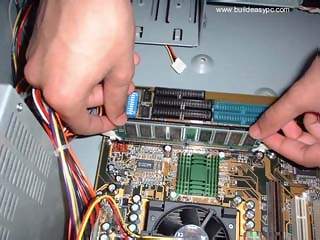
Random Access Memory - an integrated circuit memory chip that allows information to be stored or accessed in any order and brought up on the screen. Most commonly measured in Megabytes(Mb) or Gigabytes(Gb). The most common types are PC100 SDRAM, PC133 SDRAM, PC200 DDRAM, and PC266 DDRAM. The most common memory sizes are 32 MB, 64 MB, 128 MB, 256 MB, and 512 MB.
You need RAM for the computer to store and access free memory to run your programs. If you are into high graphics programs or games, you may need to consider buying a 512 MB RAM or even 1 GB RAM.
The RAM banks on your motherboard should look similar in the picture below. Spread the white clips on the banks to each side. This will allow for the easy insertion of the RAM chips.
Clasp the top corners of the RAM chips and insert it into the slot. Gently push down the RAM in a downward motion into the memory slot. Once the RAM chips are in place the two white clips will now become straight and will clasp over the corners of the RAM chips, securing it. Caution: Pressing the RAM chips in too hard could cause damage to the board or the RAM banks.
Disclaimer: We are not responsible for any damage that you may incur while following our instructions. Some information and picture courtesy of www.buildeasypc.com